InsightsTechnical website performance
Website Performance & Core Web Vitals: The Technical Guide for 2026
What Core Web Vitals measure, what the studies that hold up say speed is worth, and the fixes that move LCP, INP and CLS, with before-and-after lab measurements from our own builds.
26 March 2026Updated 30 September 202617 min readEdited by Michael Wilkins
Direct answer
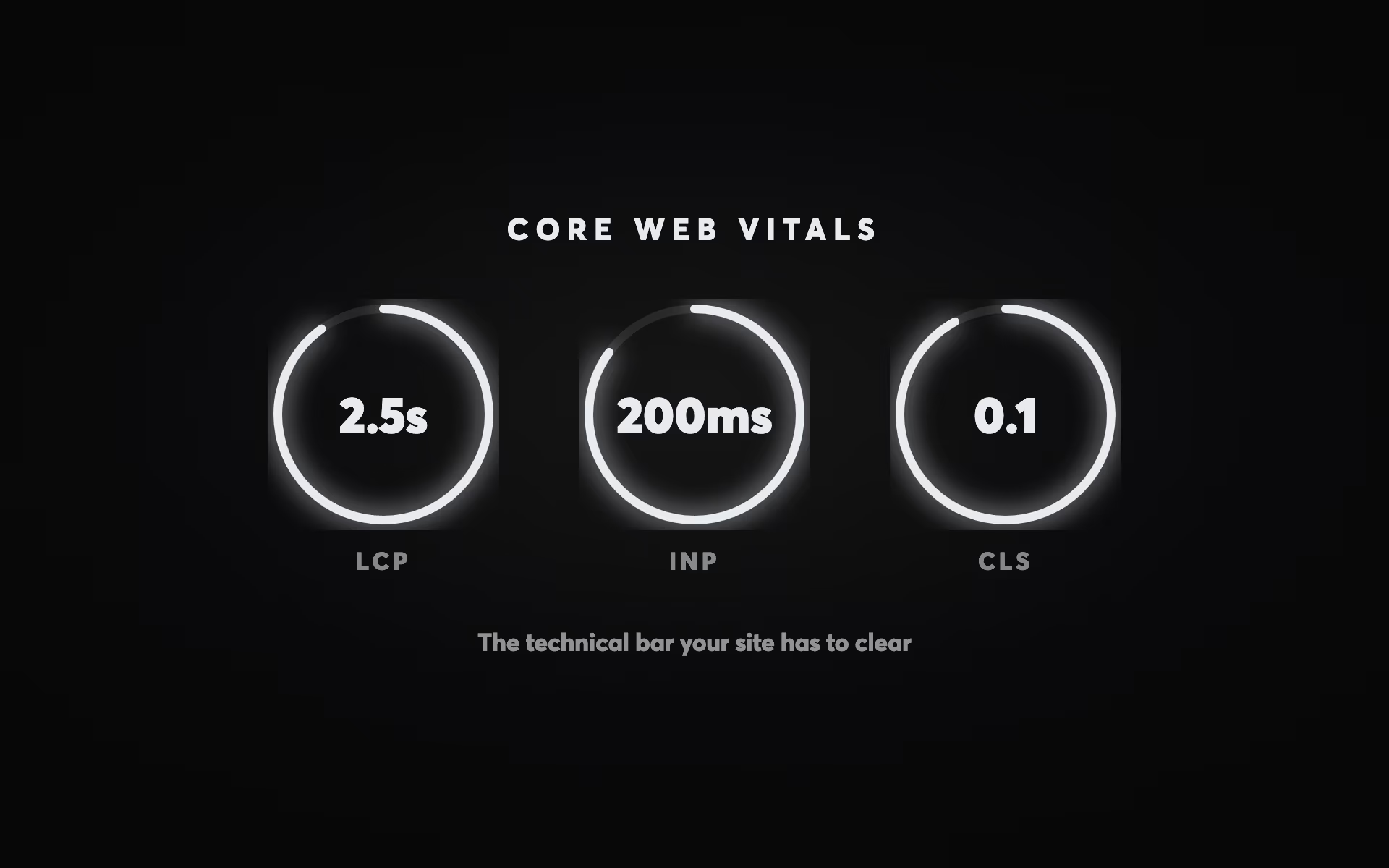
Core Web Vitals are Google's three measures of how a page behaves for real visitors: Largest Contentful Paint for loading (good is 2.5 seconds or less), Interaction to Next Paint for responsiveness (200 milliseconds or less) and Cumulative Layout Shift for visual stability (0.1 or less), each judged at the 75th percentile of visits. Google's ranking systems use them, but relevance comes first, so they settle close contests rather than lift weak pages. They matter more to conversions: in a 2021 A/B test, Vodafone found a landing page with 31% better LCP produced 8% more sales. In the 2025 Web Almanac (July 2025 data), only 48% of mobile websites passed all three. The biggest fixes are usually modern image formats at the size displayed, less third-party JavaScript and an edge cache. One Australian insurance broker's current site scores 29 for mobile performance in PageSpeed Insights; our rebuild of the same design scores 97 (lab tests, September 2026).
How fast a page loads and responds is one of the signals Google's ranking systems use, and a bigger factor in whether the people who arrive stay long enough to enquire. It is also one of the few parts of a website that can be measured precisely, which makes it easy to fix in the wrong order: chasing a lab score instead of whatever is slowing real visitors down.
This guide covers what Core Web Vitals measure, what the studies that hold up say speed is worth, and the fixes that move each metric, in order of payoff. It doesn't cover crawling, indexing, structured data or AI crawlers; those are in our technical SEO guide. And speed is only half of a page that converts. The other half is in our guide to landing page design.
What Core Web Vitals measure
Core Web Vitals are three measurements of real visits to a page:
- Largest Contentful Paint (LCP) measures loading: how long the largest visible element, usually a hero image or a block of headline text, takes to appear. Good is 2.5 seconds or less; over 4 seconds is poor.
- Interaction to Next Paint (INP) measures responsiveness: how long the page takes to respond visibly after a click, tap or key press. Good is 200 milliseconds or less; over 500 is poor. It replaced First Input Delay on 12 March 2024 and is stricter, because it looks at every interaction during a visit rather than only the first.
- Cumulative Layout Shift (CLS) measures visual stability: how much content jumps around while the page loads. Good is 0.1 or less; over 0.25 is poor.
Each is judged at the 75th percentile of page loads, separately for mobile and desktop, so a page passes only when at least three loads in four are good (web.dev on Web Vitals). The data comes from the Chrome UX Report (CrUX), which collects measurements from real Chrome users over a rolling 28-day period. PageSpeed Insights shows it for a single URL when there is enough data and falls back to the whole site when there isn't (about PageSpeed Insights).
That field data is different from the lab score most people quote. Lighthouse, which runs inside PageSpeed Insights and Chrome's developer tools, loads the page once on a simulated device and connection and scores it out of 100. It is excellent for diagnosis but says nothing definite about your visitors, who may be on older phones and slower networks. A page can score in the 90s in the lab and still fail in the field, and the reverse.
About half of sites don't pass. The 2025 Web Almanac, using CrUX data from July 2025, found that only 48% of mobile websites passed all three Core Web Vitals (56% on desktop). On mobile, 62% had a good LCP, 77% a good INP and 81% a good CLS, which makes loading the usual weak point (HTTP Archive Web Almanac 2025).
| Metric | Good | Needs Improvement | Poor | Good on mobile |
|---|
How much Core Web Vitals matter for rankings
Google's own position is measured. It says Core Web Vitals are used by its ranking systems and recommends reaching good scores. It also says there is no single page experience signal, that good scores don't guarantee top rankings, and that it will still show the most relevant page when that page's experience is poor; where many pages are similarly relevant, a good experience can make the difference (Google on page experience). In practice that makes Core Web Vitals a contest you shouldn't lose rather than a way to outrank better content.
What speed is worth to a business
The case for speed is stronger on conversions than on rankings, but the figures usually quoted for it are old, borrowed from retail or wrongly attributed. These are the studies that hold up, and what they actually found:
- A controlled test. Vodafone ran an A/B test on a landing page in which one version was optimised for Core Web Vitals and had a 31% better LCP in the field. That version produced 8% more sales, a 15% better lead-to-visit rate and an 11% better cart-to-visit rate (web.dev, 2021).
- A large observational study. Milliseconds Make Millions, a study commissioned by Google and carried out by Deloitte and the agency 55, tracked 37 brand sites, mainly in Europe and the US, across 30 million mobile sessions at the end of 2019. A 0.1-second improvement across four speed measures came with 8.4% more conversions on retail sites and 10.1% more on travel sites. The six lead-generation sites were a mixed picture: 21.6% more visitors got from the first step of a form to submitting it, but their measured conversion rates fell (Deloitte for Google, 2020).
- A B2B comparison. Portent looked at 14 B2B lead-generation sites and six ecommerce sites in 2022 and found that a B2B site loading in one second had three times the conversion rate of one loading in five seconds, and five times the rate of one loading in ten. That's a correlation, not a test, but it's the closest published data to a service business (Portent, 2022).
None of these studied Australian or New Zealand service businesses, and none gives you a number to plug into a forecast. What they agree on is the direction: faster pages lose fewer people, and the effect shows most at the steps where people are deciding. Be wary of any calculator that turns seconds into dollars; measure your own conversion rate before and after a speed fix instead.
Same design, different build
The clearest demonstration we have of how much the build matters is one site measured twice. For an Australian speciality insurance broker, we rebuilt the current website to look the same on purpose, with the same photography, headline and calls to action, so that any difference in the numbers could only come from how the site is built. Both homepages were measured side by side in Google PageSpeed Insights on 27 September 2026 (Lighthouse 13.5.0, medians of five runs per device):
| Lab measurement | Current site | Rebuild |
|---|---|---|
| Performance score, mobile | 29 | 97 |
| Performance score, desktop | 39 | 100 |
| Largest element on a phone (LCP) | 22.7 seconds | 2.6 seconds |
| Homepage download on a phone | 12.9 MB in 176 requests | 0.5 MB in 29 requests |
The difference is all engineering. The current site sends the same full-size JPEG images to every device; the rebuild serves AVIF images at the size each screen needs, and it's served from an edge cache, so its server answers in milliseconds. These are lab measurements, not field data: the rebuild isn't live yet, and once it is, the numbers that count will be real-visitor Core Web Vitals.
LCP: get the main content on screen fast
LCP is the Core Web Vital sites fail most often, and it usually comes down to four things: a heavy hero image, a slow server response, CSS and JavaScript that block rendering, and content that only appears after JavaScript runs.
Images. Images are usually the heaviest part of a page. In the 2025 Web Almanac, the median mobile home page weighed 2.6 MB, with images the largest single part at 911 KB and JavaScript next at 632 KB (HTTP Archive, 2025). Four fixes cover most of it:
- Format. Serve AVIF or WebP. Google puts lossy WebP at 25–34% smaller than a comparable JPEG (Google), and AVIF can save more than half against JPEG, depending on the image (web.dev).
- Size. Serve each image at the size it's displayed, with
srcset, so a phone never downloads a desktop image. - Priority. Add
fetchpriority="high"to the LCP image, and never lazy-load it. - Lazy-loading. Add
loading="lazy"to images further down the page, so they load as the visitor scrolls towards them.
Our rebuilt homepages for BCS Broking and MLA Traffic weigh 124 KB and 53 KB, a small fraction of that median.
Server response. Time to First Byte (TTFB), the wait before the first byte of the page arrives, isn't a Core Web Vital, but everything else waits for it. web.dev's rough guide is 0.8 seconds or less (web.dev on TTFB), and only 44% of mobile websites managed that in 2025. The biggest fix is to stop building each page on request: serve pre-built or fully cached pages from an edge cache or CDN, close to the visitor. For Australian and New Zealand audiences, check that your host or CDN serves from locations in both countries rather than only from the US or Europe. This is what makes the difference on our own builds. BCS Broking's homepage is a static build served from an edge cache and answers in as little as 56 milliseconds; MLA Traffic's, statically generated with Astro and served from the edge, answers in around 200.
Render-blocking CSS, fonts and scripts. Anything the browser must download and process before it can paint holds up LCP. Inline the CSS the first screen needs and load the rest later, add defer to scripts that don't need to run before the page appears, and preload the one web font used above the fold.
Client-side rendering. If the main content is assembled by JavaScript in the browser, nothing meaningful can paint until that JavaScript has downloaded and run. Server-side rendering or static generation fixes it, and it matters for AI crawlers too, most of which don't run JavaScript at all, as our technical SEO guide explains.
INP: keep the page responsive
INP tracks how long the page takes to respond visibly to each click, tap and key press during a visit, and reports close to the worst of them: for most pages that's the slowest interaction, with one outlier ignored for every 50 interactions (web.dev on INP). In 2025, 77% of mobile websites passed, and the failures tend to sit where interaction matters most: forms, filters, menus and anything animated.
The cause is almost always a busy main thread. The browser's main thread runs JavaScript, works out the layout and paints the screen, and while it's in the middle of a long task (anything over 50 milliseconds) a tap has to wait. The usual culprits are third-party scripts such as chat widgets, A/B testing tools and analytics and advertising tags, large JavaScript bundles and heavy animation code. The fixes, roughly in order:
- Remove tags and plugins nobody uses any more; established sites accumulate them for years.
- Load the rest after the main content, with
asyncordefer, or with a delayed trigger in your tag manager. - Break up long tasks, and move heavy work off the main thread, into a Web Worker, where you can.
- Keep animation to what the page needs, and prefer CSS transitions to script-driven effects.
Heavy visuals don't have to cost responsiveness if they're built for it. The homepage we built for our sister company Involve Energy opens on a film that plays as the visitor scrolls: 96 AVIF frames (2.6 MB) on a desktop and a separate 48-frame square cut (482 KB) for phones, decoded off the main thread, with the browser's own scrolling driving it. It still takes a median of 97 for mobile performance in PageSpeed Insights, with no layout shift at all (Lighthouse 13.5.0, the homepage, five runs, 27 September 2026).
CLS: stop the page moving
CLS is the Core Web Vital most sites pass (81% of mobile websites in 2025), and the causes of the rest are well known:
- Images and video without dimensions. Set
widthandheighton every image and video, or an aspect ratio in CSS, so the browser reserves the space before the file arrives. - Content that arrives late. Cookie banners inserted at the top of the page, promotional bars, embeds and ads push everything below them down. Reserve their space in advance, or overlay them instead of inserting them above existing content.
- Web fonts. When a web font replaces its fallback, text can reflow. Use
font-display: optional, choose a fallback with similar proportions (thesize-adjustdescriptor helps), and preload the main font (web.dev on CLS). - The back/forward cache. Pages the browser restores from its back/forward cache come back exactly as they were left, with no shift at all, so check in Chrome's developer tools that your pages are eligible.
Where to start: fixes in order of payoff
For most business sites the first fixes are the same whatever the platform: the LCP image, image dimensions, third-party scripts and caching. The matrix ranks the common fixes by payoff for the effort involved, and the checklist after it is for working through a whole site.
| Fix | Affects | Effort | Priority | Notes |
|---|
Measuring it: the free tools
PageSpeed Insights (pagespeed.web.dev) is the place to start. It shows field data from CrUX, for the URL or for the whole site, above a Lighthouse lab test with specific diagnostics. Test your homepage, your main service pages and your enquiry page, on mobile first.
Search Console's Core Web Vitals report groups your site's URLs into Good, Needs improvement and Poor from field data, so it shows which templates have problems and how widely. Pages with too little traffic don't appear. Check it after every significant release; a new plugin or tag is a common way for a fast site to get slow.
Lighthouse in Chrome's developer tools runs the same lab test on your own machine and points at the specific LCP element, render-blocking files, images without dimensions and long tasks. Use it to diagnose a page that PageSpeed Insights has flagged. Its 0–100 performance score is a lab result and doesn't correspond directly to your field data.
For larger sites, tools such as Calibre, SpeedCurve and WebPageTest add scheduled tests and alerts. For most businesses, a monthly look at the Search Console report and a PageSpeed Insights run after every significant change is enough.
A 90-day plan
Days 1–14: quick wins. Run PageSpeed Insights on your ten most important pages and note what each one flags. Convert and resize the images above the fold, add fetchpriority="high" to each LCP image, set dimensions on every image and lazy-load the ones further down. Put the site behind a CDN or edge cache if it isn't already. Look for Poor URL groups in Search Console's Core Web Vitals report and add those templates to the list.
Days 15–45: scripts and interactions. List every third-party script on the site (Chrome's Coverage tab and your tag manager will show them), remove what nobody uses and delay the rest. Move scripts hard-coded into the page head into your tag manager, with sensible triggers. Record a performance profile of your key forms and menus in Chrome's developer tools, and fix any interaction slower than 200 milliseconds.
Days 46–90: hold the gains. Field data covers the previous 28 days, so this is when the Core Web Vitals report starts to show the change. Set a budget for page weight and LCP, add a Lighthouse check to your release process if you can, and review the report monthly. Then turn to the rest of technical SEO, from crawling and canonicals to structured data and AI crawlers, with our technical SEO guide.
If you'd like an outside view of your site, our free website audit covers what's broken under the hood, in plain English, and the three things to fix first.
Questions